

Logging into your Existing Account:
If you had an account on our old website, you do not need to create a new account. Just select the Forgot your Password reset link and follow the steps to create a new password. Please note: If you had an account in our old system and you create a new account with a different email address, you will lose access to your Legacy Order history.
Creating a New Account:
- Navigate to the Create an Account section. If you have not created an account on the new website, you will need to do so before you can log in.
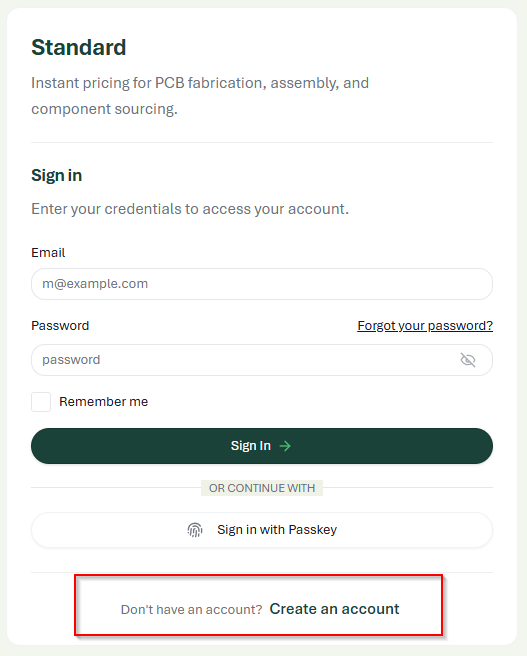
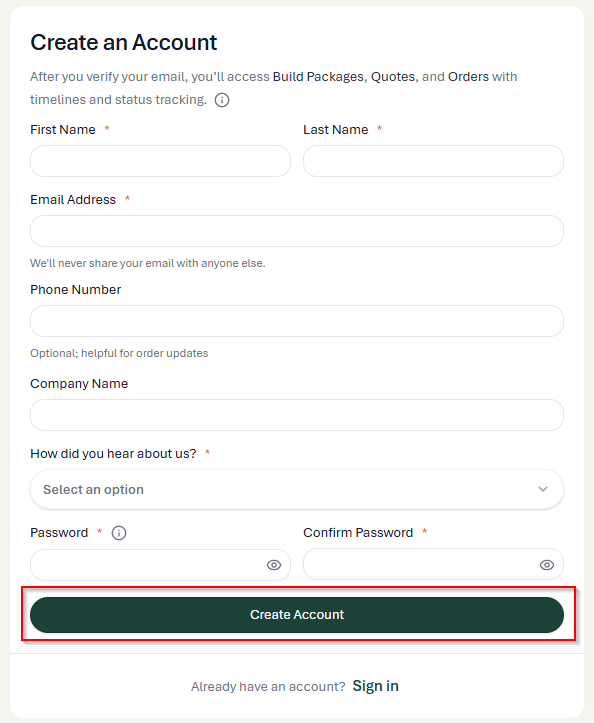
- Enter your account information and click the Create Account button when you are ready to proceed.
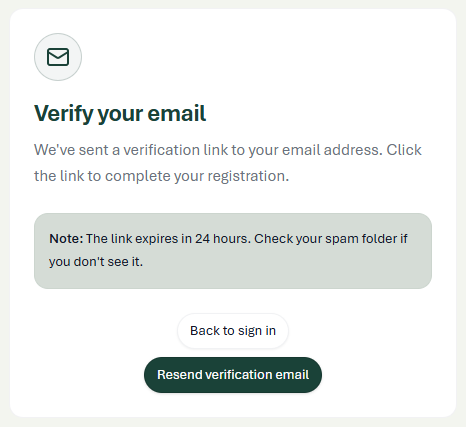
- Once you have clicked the Create Account button, you will see a message telling you to verify your email. The link is only good for 24 hours and may land in your spam folder. Navigate to your email and look for an email with the subject line: Verify your email address – from DoNotReply@screamingcircuits.com
- Once you click on the link to verify your email, a new window will open letting you know your email has been verified. Click on the “Back to sign in” button to log in to your new account.
- Enter your login credentials and click the Sign In button to proceed.
If you are part of an organization/company that would like to have multiple users with access to one account, you will want to create an organization. Please refer to our How to Establish Your Organization guide
Please note the following about Organizations:
- Examples of users in an organization would be: Engineer, Buyer, Manager, etc. Anyone who would benefit from knowing what builds, quotes, and orders your organization has worked on and what the status of each of those is.
- Admins have full access to everything on the account.
- Standard Users have access to everything, with the exception that they cannot invite new users.
- We strongly encourage you to have more than one Admin in your organization.
- Admins of your organization are the ones who can add and remove users; Screaming Circuits cannot do that for you unless we have authorized written consent from a high-ranking person in your organization.
- Users can be part of multiple organizations.
- If you have any questions about setting up your organization, please reach out to customer service or chat with us for assistance.